Showing posts with label UI. Show all posts

Thursday, July 14, 2011

Stop Motion Animation on Mobile devices

I thought my recent foray into stop motion animation using mobile devices would be worth a few words. 

Timeline

Prehistory : A while ago I bought a cheap model of our solar system from a physics supply shop in South India. It was rusted and had been sitting there in the odd shop for ages. I shipped it back to the UK and it has been taking up space for a while without good reason. Recently, before moving house, I found a reprieve for it by deciding to use it in a stop motion music video. 
This blog is a look at how I got from that idea to a finished stop motion animation video and the software, hardware and people observations along the way.

Step 1 : Choose the track.
First things first was to choose the track - one I had in both English and Spanish - double search engine and geo-juice. Easy.

Step 2 : Storyboard the idea and the props

If you can't draw like your comic book heroes then a photo based approach to creating a storyboard is a good method. I wanted something on mobile that would let me quickly shoot, arrange and annotate the scenes. 

The unbeatable Cinemek Storyboard on iPhone does this job better than any other. I'm not aware of any compeition. You can just shoot and annotate anywhere meaning when inspiration strikes you move things along quickly. Projects in their early inception stage do depend on thinking done away from desks and desktops. The Cinemek UI is simple and storyboard arranging has a great 'physics' feel and touch making it  easy to swap the scenes around.

The screenshots below show how you can use it to 
  • arrange
  • camera movements against scenes  : tracking, pans, zooms, focus, lighting. Your still images can come to life.
  • add notes and titles


I went and bought a new lamp, some special 'daylight' bulbs, black fabric, plastic bin bags, props, glue, wire and imported a iPhone4 stand from the US (Naja King). This stand allowed me to hang or stand the iPhone4 camera in all the different angles I imagined I would need. Word of note on the Naja- it can drive you mad with the slight movement it has once the new shape 'settles' thereby skewing the framing down after positioning responds to gravity. Naja has more flexibility and positioning capability than a Gorilla stand but less sturdiness - a trade off.

Naja King Flexible iPhone Stand


Step 3 :Choose Stop Motion apps and Prepare to Shoot!


Stop Motion Recorder
iTimeLapse
I must have bought and tried out all the stop motion apps that were in the Apple store.

The most fit for the job seemed to be Stop Motion Recorder and iTimeLapse.

What came out to be most important in the end was how reliable a program was. Losing 30 mins of work every 5 hours is not acceptable even if the application has all the whiz-bang features. iTimelapse wasn't reliable enough. After losing footage and periodic crashes and I resigned iTimeLapse to be a back up only. The trade off with using Stop Motion Recorder was that it was the 12 frames per second and low capture resolution. 


Step 4 : Shoot


People-ware : After doing a session or two on my own trying to get finished scenes I knew that an assistant with nimble hands could help me with the separation of shooting and set adjusting roles. Too much movement back and forth from camera to set takes up time and makes the whole thing slow. 

I hired someone I knew who studies fine art to help out with further set-making and the shoot. This was a wise move. 


We slogged it out and got most of the first half of the video. Stop motion animation is always more effort than you imagine. It's finicky! People say you should double estimates on average - with stop motion you treble it and budget for extra medication.

High Spec for
iTimelapse
After my time had expired with the assistant I had to shoot the remainder myself. Mostly the solar system scenes.  I noticed that iTimelapse had released a new version of their app and it was more stable. Quandary. Do I double the quality of image capture half way through the shoot or keep with the look/feel I have?

Using the logic that the video was in two halves 1) man in the house) 2) man in the solar system) I convinced myself that it could change resolution for the second half.

I looked more seriously into the audio trigger method on iTimelapse to take a photo i.e. shout "now!" then 'click' a shot is taken. It worked well once the sound levels were tweaked and even the misfires due to my thumping around in the 'scene' positioning things were easily edited out.

I managed to get the rest of the footage.


Step 4.5 - Make the decision about whether to continue developing the project solely on mobile. ..

This was quite a quick decision.

iMovie iOS (the major compositing tool on mobile for video) wasn't suitable because  :

  • It has some memory problems and performance issues
  • I simply needed a bigger screen to see what I had shot. It was time to take a good look.
  • No ability to run plugins in-line and a lack of features
  • I am more able with Final Cut Express than iMovie so pre-production with the mobile iMovie being imported into PC based iMovie wasn't a draw either

Maybe an iPad would have helped with the bigger screen but at the present time nothing beats editing and compositing on a powerful machine with a big screen.

Desktop and big screen win then.

Step 5 - Import
QuickTime import of Image Sequences
I imported the stop-motion data from my iPhone and quickly filled the iPhoto library up with thousands of photos only slightly different from one another (my wife took it well given it is a shared Mac). I spent some time fixing the orientation of some of the shots, due to the phone gyroscope flipping periodically, and then they were ready to use.

Final Cut Express does not do importing of individual frames to create video so I had to buy QuickTime Pro to get a good method of creating video footage from a sequence of photos. QuickTimePro also allowed me to specify the exact dimensions of the photos. The mobile apps had cut and trim problems when they exported video which is why I was working in photos and not video by this time.

Step 6 - Edit


Final Cut Express
Final Cut Express is a really good tool once you put some time in to learn it. My work with audio editing and compositing is translatable to video editing concepts so I had a quicker start when I first used it.

I have one of the KB Rubber Keyboard Covers that shows all the Final Cut Express shortcuts which is really useful. Shortcuts for me however are only a band aid as there are so many pieces of software I use that the only real solution for being quick with all my apps would be to have voice recognition.

I used only two plugins very sparingly - a contrast and brightness adjustment to make sure the plastic bin bags representing the cosmos looked dark enough and a plugin called  Lock and Load Express which smooths out shaky footage. Using Lock and Load has a tradeoff though as it selects a subset of the frame which bests stitches with the next frame. Using this approach it finds subset squares per frame as a path through the stills - like threading a needle almost. When shooting at 12 frames a second this was quite noticeable from a textural and resolution standpoint so I restrained to using it only for the manual stop-motion zoom effects I had tried which were very shaky.

Lock and Load Express

Step 7 - Master and Export


All done in Final Cut Pro. The export options are very simple and allow you to select high speed broadband as the likely consumption method making a QuickTime file small enough to upload to YouTube and other services.

I had an English and a Spanish version of the video so one export each while muting the other language track.

Step 8 - Promote

To get it indexed properly by the 'machine' I did the following :

  • I used Spanish metadata for the Spanish language version whenever posted
  • Put direct hyperlinks into the YouTube metadata pointing to my website
  • Did a short music blog on Blogger and pinged feedburner.
  • Put the video on Musician Profile Aggregator sites such as Artist Data, MusicSubmit
  • I wrote this post to improve search engine links. This post is a technical article to create a cross domain link from science and technology into the arts and music
  • Put it on my music website (both the front-page, videos section and on the album pages that it was taken from)
  • Updated my YouTube channel to have this as the default video
  • Put it on MySpace
  • Did status update on my personal Facebook and my Facebook music page
  • Put it on Twitter with hashtags to catch those searching for video and animation.

I could have done more submissions to other sites (Yahoo, MetaCafe) but I couldn't be bothered - YouTube, Google, Facebook and Twitter and the behemoths for video discovery. If need be I'll add more node juice later on.

I'll keep an eye on Google and YouTube Analytics for now to see how it gets on and whether the Spanish or the English version gets the most eyeballs.

Final
So is it possible to shoot and edit stop motion animation entirely on mobile? 

The short answer is that for preparation and capture that mobile is preferable but for editing and mastering the final video piece you still need a big machine.


Enjoy the video!

    
The final video is here in English
and here in Spanish


Thursday, May 19, 2011

Wearable and Always On Computing

I'll be surprised if 2011 doesn't see something further happen around the wearable computing space.  We need to stop tinkering with metal boxes and facilitate direct interaction with the world a bit more.

There are two social dynamics to this kind of interfacing:

1. Broadcast the display externally on walls, tables, car bonnets or bodies (not private) OR
2. Broadcast internally on glasses or hidden earpieces (i.e. privately).

I think both approaches are more favourable to the current head down into a mobile neck stretch. Mobiles are private devices and Tablets/iPads a bit less so but they are both metal objects you have to put in front of your face and carry around.  The world is only there in periphery when using devices like these. 

Directly communicating with others and including the web as a 'third voice' is still not an elegant flow when taken out of presentation theatres and onto buses and high streets.

Pervasive and wearable computing will see an always-on environment for audio and video. The machines will listen to you 24/7 and parse what you say. The video components will continually record and pattern match the objects around you. Forget Amazon recommends when the data you can input is your whole day! We don't need to key the data about us like monkeys with typewriters. Spines everywhere will rejoice as we lift our heads to look back at the world once more.

The demos from MIT Wearable Computing Team in 2009 still look fantastic and the prototype only cost around $300 back then.


The TED talk - Pattie Maes' lab at MIT, spearheaded by Pranav Mistry


The interface ideas


The evolution of Steve Manns private eye glass display


Monday, June 21, 2010

Another angle on Social Computing - the iPad

There was a distinct ethereal hum as I finally added an iPad to my iPhone, iPod, Powerbook, iMac and G5 kingdom.

I had to answer some questions for myself on something that felt 'game changing' - magic almost.

What is the magic in the hardware, form factor and software of the iPad?
  • Given it's size it travels from room to room with you. The only other computing device that really does that is a feature/modern phone. Laptops get parked which equals bad for a prospective command centre and true on body device.
  • The role of phones will change. The size of displays for pocket devices have limits (technical and social) that the iPad immediately begins to highlight. Phone's may be more of a cousin of your car key, wallet and GPS devices than the final form factor of the utopian 'life controller'. Phone holographic technology would of course help phones reassert themselves as a social device rather than a private device.
  • Works great as you walk and use the device using only 1 hand (unlike a laptop) for essential workflow tasks of the OS (cut copy-paste-search-open-close) , in fact most programs and tasks are possible given multi-touch to allow context. It also works really well with 2 hands allowing richer expression and depth of interaction.
  • No wires and it fits everywhere - that's a fail for most laptops which demand height as well as depth on a desk or surface. iPad display and control are merged into one flat surface.
  • The resolution is great - it looks like an interactive magazine.
  • It wins the war hands down as the master input device for contacts and calendar control. Phone calendar co-working was not convenient with phones or laptops. Laptops feel 'official' and had to be crowded round with a bent neck (or worse via ping pong mail). The iPadCalendar experience is one where you co-author it with your spouse or friend or colleague sitting next to one another...on the couch, standing in the kitchen, and so on. Passing the iPad back and forth so everyone can download their details makes for good 'ownership' of events and to-do's and will prompt healthier use. This form factor, so far, is the best capture tool and it's social - just like calendars and are meant to be.
  • The e-book, e-comic and e-magazine have arrived - they never had before. iPad allows you to zoom on article, photos, paintings or Maps. Hand it to a friend. Magazines can't compete...physical books also look like they will get in the neck strong if iBooks is anything to go by.
  • Contact data and references (URL's etc) really are ubiquitous and synchronised across all my equipment. Retyping was hurting the mass uptake of computing - we need to do away with it. A combination of mobileMe, wireless and apple core products (itunes, iphoto et al) ensures that data, preferences and references are available, accessible and synced no matter where you are. No mean feat.
  • Resolution of expression for multi-touch fingers. So much more satisfying for almost all application experiences from innocuous address book management and browsing to rich real-time control audio/visual applications.

The form factor of the iPad makes it a truly social device
The laptop and the mobile are personal computers - we don't share them physically with others much at all. They are social in that they can enable 'remotely social' experiences but it's a private affair.

This is where the iPad and form factors like it have a potential to shine ... families passing it round to arrange the trip to the lakes, band members trimming the email marketing list collectively, waiters allowing customers to select their choice and then taking the device to send wirelessly to the kitchen, putting in in grandma's lap to see slideshows.

but it's not all honey...
  • The weight - any more weight for the iPad would be a fail but it just gets away with it.
  • Heat - beware your iPad in strong sunlight...it heats up quickly and then forbids you to use it until it cools down.
  • Power and Charging - Non native chargers that work for iPhones don't fare well with the iPad.
  • Utilising other devices - I'm not a fan of the buy a wireless or a wireless with 3G simcard approach. It's a bad fit as iPad demographic probably already have mobile data contracts and don't want another. I'd have much rather payed an extra levy per month on my network provider bill (O2) to use my iPhone as a modem. The iPad is a natural main console for all your computing so it would have been nice to see utilisation of slave devices such as iPhone available out of the box - specifically from Apple rather than a 3rd party integrator.
  • Upfront user profiles. Given the inherently social capability of the device it is a miss to not have controls for multiple user profiles.

We live in interesting times alright.


Wednesday, February 27, 2008

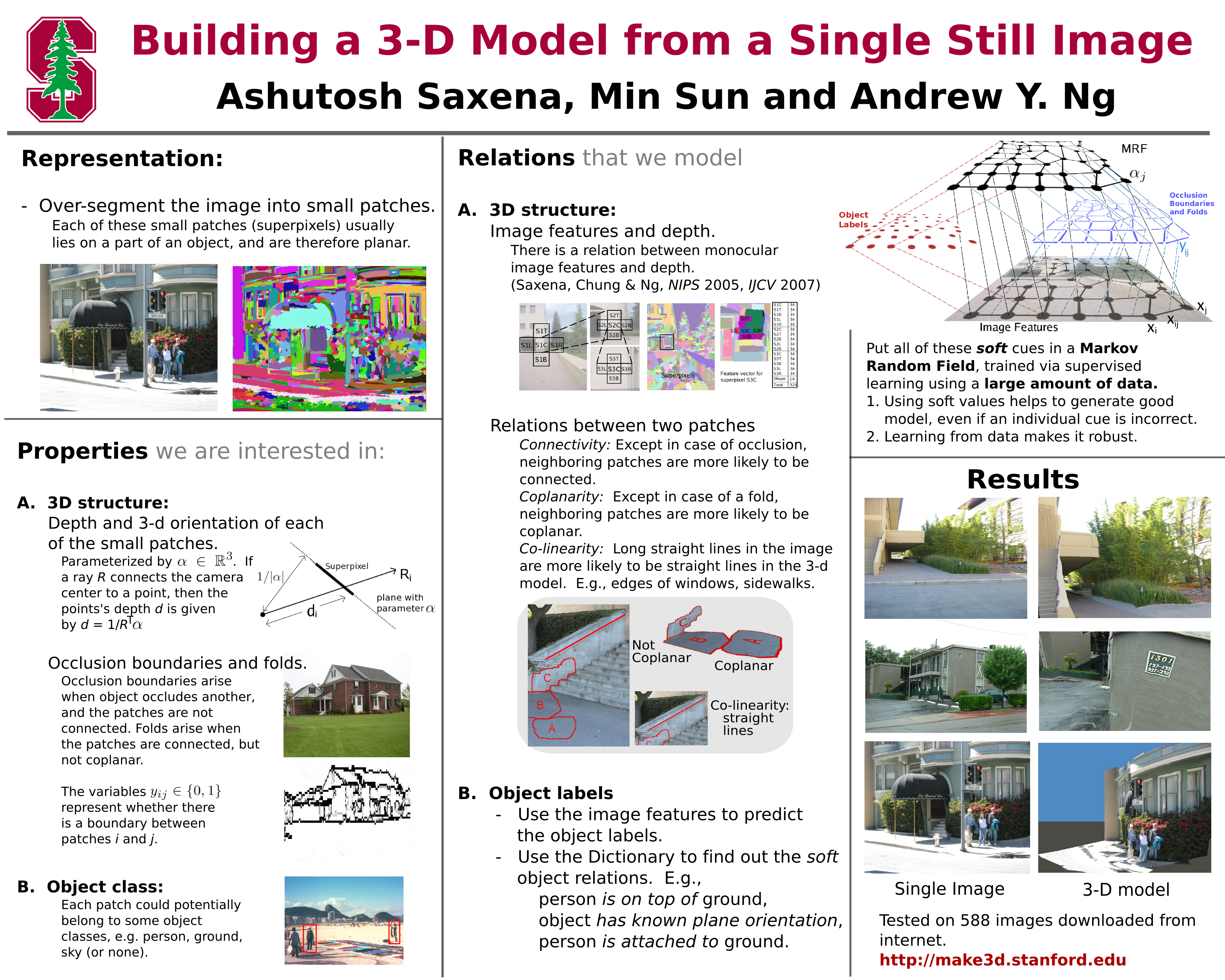
Stanford's Make3D - 3D flythroughs from a single 2D image

Make3D is a project from two Stanford students that won a 'best paper' award at the International Conference on Computer Vision in Rio de Janeiro in October 2007.

The online service takes a 2D image and creates a 3D'esque fly around models that include depth and a range views. Photos can be uploaded directly or pulled into the site from Flickr - however the service requires that you rate at least five images before you can pull them in from Flickr. You can jump in and just use the upload from hard drive option though

Click through to this link to see an example of it in action from a photo I took in Egypt at the pyramids:


Note: it doesn't work for Intel Mac and Shockwave but there is a workaround for installing a VRML viewer for Linux which will be given to you as an option.

The tech lowdown on the algorithm from January Stanford News Service :

…the algorithm breaks the image up into tiny planes called “superpixels,” which are within the image and have very uniform color, brightness and other attributes. By looking at a superpixel in concert with its neighbors, analyzing changes such as gradations of texture, the algorithm makes a judgment about how far it is from the viewer and what its orientation in space is. Unlike some previous algorithms, the Stanford one can account for planes at any angle, not just horizontal or vertical. This allows it to create models for scenes that have planes at many orientations, such as the curved branches of trees or the slopes of mountains.

An excellent diagram on the process can be found here.

This is one of the first web services of this ilk out of the starting gate. Microsoft have had Photosynth for a while but instead of using one image to derive the model it meshes together multiple images.

Monday, February 25, 2008

Don't Click It

http://www.dontclick.it/


This is a great little project that allows you to navigate and do your web business without ever having to click on bit of the virtual screen. Although a little migraine inducing as the screens change constantly it is actually quite simple to use.

Contextual actions for such an interface (normally provided by right mouse click) will have to be programmed in from the beginning as part of the UI. A pretty big plus is the removal of tendon damage from all the inane clicking we do.

Another aspect of this type of interface is that with a simple projector and a flat surface (i.e. a desk) you could even use your finger OR a stick to move around the virtual space and options.

I dig (single g) it.

Monday, February 18, 2008

Speaking Freely

"You are currently studying user generated content and I'm not obsessed with the fact about trying to become the next ___."

spoken through SpinVox


What was actually said:

"We are currently studying User Generated Content and we're not obsessed with trying to become the next Facebook"

Saturday, February 16, 2008

Speaking Freely

"The majority of computing is working collectively towards murtuality."

spoken through SpinVox


What was actually said

"The majority of computing is working collectively towards Virtual Reality"


Thursday, February 14, 2008

Speaking Freely

Speak your blog through SpinVox now.

I'm reading this first blog over the spin Vox Service. This service knocks me out and I christen this blog off the coff(?) IT stuff.

@We set ourselves free and avoid the Darwinian ending of big thumbs.

spoken through SpinVox


What was actually said

"Speak your blog through SpinVox now. I'm reading this first blog over the SpinVox service. This service knocks me out and I christen this blog Off The Cuff IT Stuff". We set ourselves free and avoid the Darwinian ending of big thumbs"